Automated SEO Audit Workflow: Full Technical Analysis from 1 URL
In my video today, I walk you through a complete automated workflow that performs a full technical SEO and website performance audit starting from just a single URL. This isn’t a basic site checker—it’s a comprehensive system that generates detailed reports with actionable fixes to improve your rankings and site performance.
I explain how this workflow combines multiple powerful APIs including DataForSEO, Firecrawl, Perplexity, and Google Gemini to analyze your website’s health and provide professional-grade insights.
Watch as I demonstrate the entire audit process from start to finish.
What This Automated Audit Workflow Does
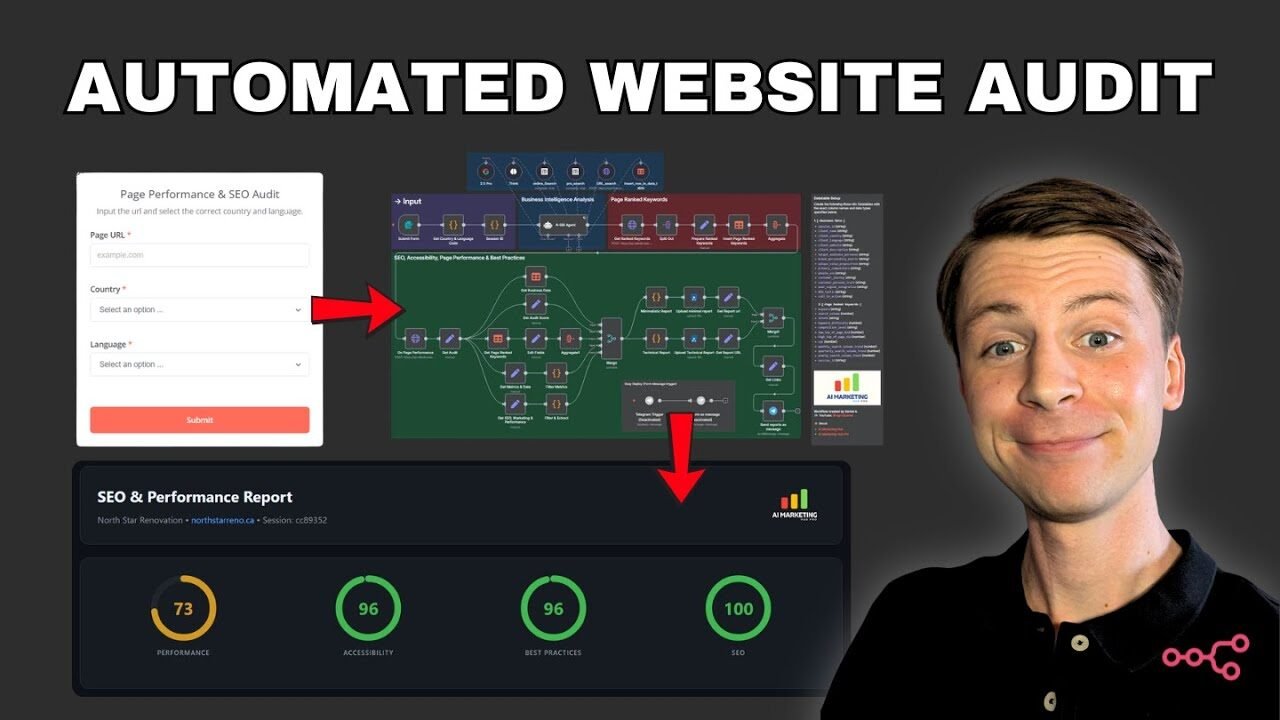
In my video, I demonstrate how this workflow creates a comprehensive report that includes performance scores, accessibility metrics, SEO scores, and core web vitals. The system also identifies which keywords your page is currently ranking for, provides a detailed technical audit, and offers specific tips and tricks on how to fix errors or performance issues that might be holding your rankings back.
The entire automation starts with a simple form submission where you enter the page URL, select your country (like United States), and choose your language from a dropdown menu. Once you hit submit, the workflow automatically runs and sends you a complete audit report via Telegram when finished.
The Power of DataForSEO Integration
I explain in my video that this workflow uses DataForSEO, which is a powerful SEO and competitor analysis stack that provides really good and relevant data about your competitors, keyword research, and anything SEO related. The system pulls country and language codes specifically for DataForSEO to ensure accurate regional data.
One of the most valuable features is the ranked keywords analysis. The workflow checks exactly what keywords your website is currently ranking for and provides detailed metrics including search volume, intent, difficulty, competition level, and CPC data. You also get monthly search volume trends broken down by quarter and year, which gives you incredible insight into seasonal performance patterns.
The AI Agent and Its Tools
In my demonstration, I show how the workflow uses a specialized AI agent powered by Gemini 2.5 Pro as the language model. This agent has several tools at its disposal including online search capabilities, pro search from Perplexity, and URL search from Firecrawl. The agent also inserts data rows into a table for future reference and analysis.
The agent automatically gathers comprehensive business intelligence including client country, language, website description, target audience, brand personality, and primary competitors. All this information gets stored in a data table that can be referenced later or even fed into another workflow if needed.
Google Lighthouse Performance Analysis
I explain how the workflow analyzes on-page performance by pulling Google Lighthouse data from the page. In my example using ifilters.com, the performance score was only 32 out of 100, which is quite poor. The largest contentful paint was taking a staggering 25 seconds, which severely impacts the page performance.
The goal is to get all performance metrics to at least 85-90, with the perfect score being 100 for each metric. The workflow provides detailed breakdowns of performance, accessibility, best practices, and SEO scores, making it clear exactly where improvements need to be made.
What’s Inside the Final Report
In my video walkthrough, I show you the comprehensive report that gets generated. It starts with an overview showing the performance score, accessibility score, and SEO score at a glance. The report includes a business overview section with all the contextual information about the website, target audience, and brand personality that the AI agent gathered.
The technical health section is particularly valuable because it checks if your website is crawlable. This is critical because if AI searchers and bots can’t properly crawl your website, you won’t rank well in search results. The currently ranked keywords section lets you see what’s performing and can be sorted by month, quarter, year, intent, competition, CPC, and other metrics pulled from DataForSEO.
Detailed Technical Audit Section
One of the coolest parts I demonstrate in my video is the detailed technical audit. This section shows you exactly what needs to be fixed with specific, actionable recommendations. All the data comes from trusted sources like Chrome developer tools and Google, since it’s pulled from Google Lighthouse.
You get specific links to documentation and resources that explain how to fix each issue. This makes it easy to hand off to a developer or work through the fixes yourself. The report identifies which elements need optimization and provides clear steps to achieve a perfect 100 out of 100 performance score.
Flexible Report Formats
I show in my video that the workflow generates both a detailed technical report and a minimalistic version. The detailed report is perfect for developers and SEO strategists who need all the technical specifications and fixing instructions. The minimalistic report is ideal for sharing with clients who want a high-level overview without getting into technical weeds.
Both reports can be downloaded as PDFs, making it simple to share with team members, developers, clients, or SEO strategists. This flexibility means you can customize your communication based on your audience while still maintaining professional reporting standards.
How This Compares to Professional SEO Tools
In my video, I mention that this workflow is similar to professional tools like SEMrush or Ahrefs, but it’s built entirely in n8n automation platform. The key difference is that you have complete control over the workflow and can customize it to your specific needs. You’re also combining multiple best-in-class APIs to get comprehensive data rather than relying on a single platform.
The workflow orchestrates DataForSEO for SERP analysis, Firecrawl and Perplexity for advanced web research, and Google Gemini as the AI brain. N8n brings all these pieces together seamlessly to create a professional-grade audit system that runs automatically.
Access to the Complete Workflow
I explain that this automated audit workflow is available in my PRO Skool community called AI Marketing Hub Pro. In this community, we focus on everything AI related for marketing, including numerous workflows like keyword research and SEO performance dashboards. Members can download the workflow and run it straight away on their own n8n instance.
The Skool community also provides guidance for creators on exactly how to rank. You get access to all the workflows I create plus ongoing support and updates as I refine and improve these automation systems. If you’re new to AI automation, there’s also a free Skool community where you can start your journey.
Technical Implementation Details
Throughout my video, I demonstrate how the workflow uses form submission as the trigger mechanism. Each workflow run gets assigned a unique session ID to keep everything organized. The data flows through the AI agent, which processes the URL and gathers comprehensive business and competitive intelligence automatically.
The system then pulls Google Lighthouse data to analyze page performance, retrieves ranked keywords from DataForSEO, and compiles everything into beautifully formatted reports. Finally, it sends a Telegram message with the completed report, making it easy to receive notifications on your phone or desktop as soon as the audit is complete.